How to find something
Most time, we need to find something in the computer, or in file content, no matter what, it was a really important skill for you.
Regex
Very Important , just go to this site https://www.hackerrank.com/domains/regex, and do it completely. and wildcard just similar like it, but absolutely not the same one.

- find
find [path] [options] [tests] [actions]
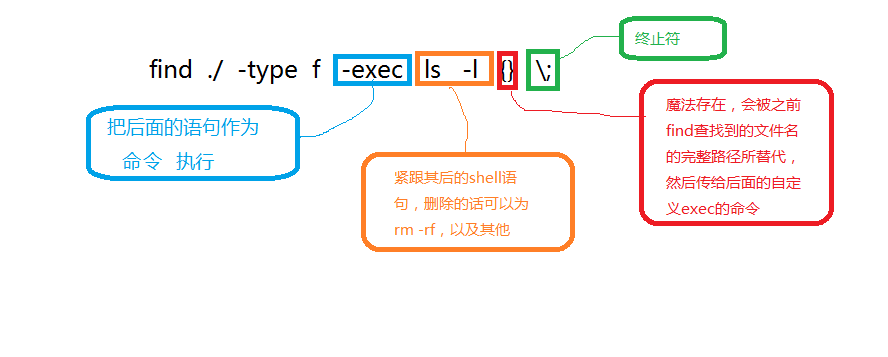
$find / -type f -exec grep -H 'text-to-find-here' {} \;

# blow code was copyed from http://alvinalexander.com/unix/edu/examples/
basic 'find file' commands
--------------------------
find / -name foo.txt -type f -print             # full command
find / -name foo.txt -type f                    # -print isn't necessary
find / -name foo.txt                            # don't have to specify "type==file"
find . -name foo.txt                            # search under the current dir
find . -name "foo.*"                            # wildcard
find . -name "*.txt"                            # wildcard
find /users/al -name Cookbook -type d           # search '/users/al'

search multiple dirs
--------------------
find /opt /usr /var -name foo.scala -type f     # search multiple dirs

case-insensitive searching
--------------------------
find . -iname foo                               # find foo, Foo, FOo, FOO, etc.
find . -iname foo -type d                       # same thing, but only dirs
find . -iname foo -type f                       # same thing, but only files

find files with different extensions
------------------------------------
find . -type f \( -name "*.c" -o -name "*.sh" \)                       # *.c and *.sh files
find . -type f \( -name "*cache" -o -name "*xml" -o -name "*html" \)   # three patterns

find files that don't match a pattern (-not)
--------------------------------------------
find . -type f -not -name "*.html"                                # find all files not ending in ".html"

find files by text in the file (find + grep)
--------------------------------------------
find . -type f -name "*.java" -exec grep -l StringBuffer {} \;    # find StringBuffer in all *.java files
find . -type f -name "*.java" -exec grep -il string {} \;         # ignore case with -i option
find . -type f -name "*.gz" -exec zgrep 'GET /foo' {} \;          # search for a string in gzip'd files

5 lines before, 10 lines after grep matches
-------------------------------------------
find . -type f -name "*.scala" -exec grep -B5 -A10 'null' {} \;
     (see http://alvinalexander.com/linux-unix/find-grep-print-lines-before-after-search-term)

find files and act on them (find + exec)
----------------------------------------
find /usr/local -name "*.html" -type f -exec chmod 644 {} \;      # change html files to mode 644
find htdocs cgi-bin -name "*.cgi" -type f -exec chmod 755 {} \;   # change cgi files to mode 755
find . -name "*.pl" -exec ls -ld {} \;                            # run ls command on files found

find and copy
-------------
find . -type f -name "*.mp3" -exec cp {} /tmp/MusicFiles \;       # cp *.mp3 files to /tmp/MusicFiles

copy one file to many dirs
--------------------------
find dir1 dir2 dir3 dir4 -type d -exec cp header.shtml {} \;      # copy the file header.shtml to those dirs

find and delete
---------------
find . -type f -name "Foo*" -exec rm {} \;                        # remove all "Foo*" files under current dir
find . -type d -name CVS -exec rm -r {} \;                        # remove all subdirectories named "CVS" under current dir

find files by modification time
-------------------------------
find . -mtime 1               # 24 hours
find . -mtime -7              # last 7 days
find . -mtime -7 -type f      # just files
find . -mtime -7 -type d      # just dirs

find files by modification time using a temp file
-------------------------------------------------
touch 09301330 poop           # 1) create a temp file with a specific timestamp
find . -mnewer poop           # 2) returns a list of new files
rm poop                       # 3) rm the temp file

find with time: this works on mac os x
--------------------------------------
find / -newerct '1 minute ago' -print

find and tar
------------
find . -type f -name "*.java" | xargs tar cvf myfile.tar
find . -type f -name "*.java" | xargs tar rvf myfile.tar
     (see http://alvinalexander.com/blog/post/linux-unix/using-find-xargs-tar-create-huge-archive-cygwin-linux-unix
     for more information)

find, tar, and xargs
--------------------
find . -name -type f '*.mp3' -mtime -180 -print0 | xargs -0 tar rvf music.tar
     (-print0 helps handle spaces in filenames)
     (see http://alvinalexander.com/mac-os-x/mac-backup-filename-directories-spaces-find-tar-xargs)

find and pax (instead of xargs and tar)
---------------------------------------
find . -type f -name "*html" | xargs tar cvf jw-htmlfiles.tar -
find . -type f -name "*html" | pax -w -f jw-htmlfiles.tar
     (see http://alvinalexander.com/blog/post/linux-unix/using-pax-instead-of-tar)
- grep/egrep
code from reference 3, and my suggestion is egrep....
search for a string in one or more files
----------------------------------------
grep 'fred' /etc/passwd              # search for lines containing 'fred' in /etc/passwd
grep fred /etc/passwd                # quotes usually not when you don't use regex patterns
grep null *.scala                    # search multiple files

case-insensitive
----------------
grep -i joe users.txt                # find joe, Joe, JOe, JOE, etc.

regular expressions
-------------------
grep '^fred' /etc/passwd             # find 'fred', but only at the start of a line
grep '[FG]oo' *                      # find Foo or Goo in all files in the current dir
grep '[0-9][0-9][0-9]' *             # find all lines in all files in the current dir with three numbers in a row

display matching filenames, not lines
-------------------------------------
grep -l StartInterval *.plist        # show all filenames containing the string 'StartInterval'
grep -il StartInterval *.plist       # same thing, case-insensitive

show matching line numbers
--------------------------
grep -n we gettysburg-address.txt    # show line numbers as well as the matching lines

lines before and after grep match
---------------------------------
grep -B5 "the living" gettysburg-address.txt        # show all matches, and five lines before each match
grep -A10 "the living" gettysburg-address.txt       # show all matches, and ten lines after each match
grep -B5 -A5 "the living" gettysburg-address.txt    # five lines before and ten lines after

reverse the meaning
-------------------
grep -v fred /etc/passwd             # find any line *not* containing 'fred'
grep -vi fred /etc/passwd            # same thing, case-insensitive

grep in a pipeline
------------------
ps auxwww | grep httpd               # all processes containing 'httpd'
ps auxwww | grep -i java             # all processes containing 'java', ignoring case
ls -al | grep '^d'                   # list all dirs in the current dir

search for multiple patterns
----------------------------
egrep 'apple|banana|orange' *                                                         # search for multiple patterns, all files in current dir
egrep -i 'apple|banana|orange' *                                                      # same thing, case-insensitive
egrep 'score|nation|liberty|equal' gettysburg-address.txt                             # all lines matching multiple patterns
locate -i calendar | grep Users | egrep -vi 'twiki|gif|shtml|drupal-7|java|PNG'       # oh yeah
       (see http://alvinalexander.com/linux-unix/linux-egrep-multiple-regular-expressions-regex)

multiple search strings, multiple filename patterns
---------------------------------------------------
grep -li "jtable" $(find . -name "*.java,v" -exec grep -li "prevayl" {} \;)           # find all files named "*.java,v" containing both
                                                                                      # 'prevayl' and 'jtable'

grep + find
-----------
find . -type f -exec grep -il 'foo' {} \;     # print all filenames of files under current dir containing 'foo', case-insensitive

recursive grep search
---------------------
grep -rl 'null' .                             # very similar to the previous find command; does a recursive search
grep -ril 'null' /home/al/sarah /var/www      # search multiple dirs
egrep -ril 'aja|alvin' .                      # multiple patterns, recursive
      (see http://alvinalexander.com/linux-unix/recursive-grep-r-searching-egrep-find)

grep gzip files
---------------
zgrep foo myfile.gz                           # all lines containing the pattern 'foo'
zgrep 'GET /blog' access_log.gz               # all lines containing 'GET /blog'
zgrep 'GET /blog' access_log.gz | more        # same thing, case-insensitive
Reference:
- find and grep : http://iami.xyz/find-Useage/
- find useage collections : http://alvinalexander.com/unix/edu/examples/find.shtml
- grep useage collections: http://alvinalexander.com/unix/edu/examples/grep.shtml